


.png) 手机流量卡
手机流量卡 免费领卡·号卡店铺
 关于本站
关于本站OAuth 2.0 认证授权实战教程:从原理到安全实践
OAuth 2.0 是现代互联网认证授权的基石协议,它让第三方应用能够在不暴露用户密码的情况下,安全地访问用户在服务提供商处的受保护资源。本文将深入讲解 OAuth 2.0 的核心概念、四种授权流程、JWT Token 机制、刷新令牌策略以及安全最佳实践,并配以完整的实战代码示例,帮助你真正掌握这一关键技术。
一、OAuth 2.0 核心概念
OAuth 2.0 是一个开放标准的授权协议,允许用户授权第三方应用访问其在某服务提供商上存储的私有资源(如照片、视频、联系人列表),而无需将用户名和密码提供给第三方应用。它的核心设计理念是将认证与授权分离,通过令牌机制实现安全、可控的资源访问。
1.1 核心角色
OAuth 2.0 定义了四个核心角色:
- 资源所有者(Resource Owner):通常指用户,拥有受保护资源的实体。
- 客户端(Client):第三方应用,请求访问受保护资源的应用程序。
- 授权服务器(Authorization Server):认证用户身份并颁发访问令牌的服务器。
- 资源服务器(Resource Server):存储受保护资源的服务器,接受并验证访问令牌。
1.2 核心术语
- 访问令牌(Access Token):用于访问受保护资源的凭证,具有有限的生命周期和权限范围。
- 刷新令牌(Refresh Token):用于获取新的访问令牌,生命周期较长,通常存储在安全的地方。
- 授权范围(Scope):定义客户端请求的权限范围,如 read、write、admin 等。
- 客户端 ID 和密钥(Client ID & Secret):用于标识和验证客户端应用。
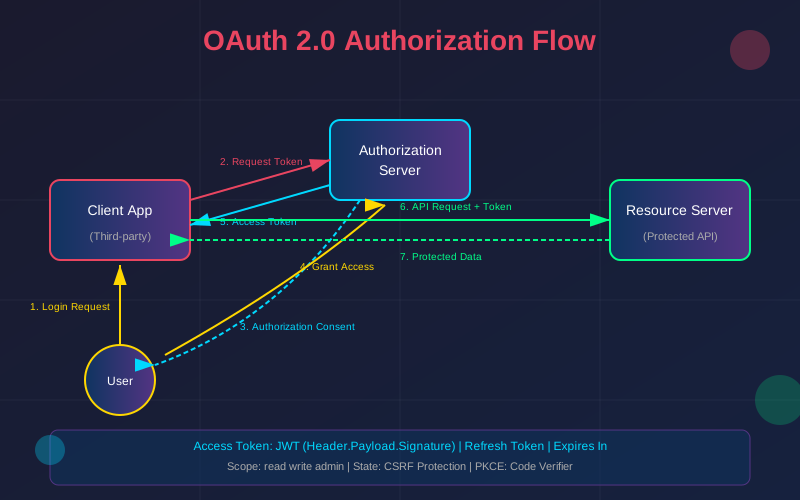
二、四种授权流程详解
OAuth 2.0 定义了四种授权许可类型,每种适用于不同的场景和安全要求。
2.1 授权码模式(Authorization Code Grant)
这是最安全、最常用的授权流程,适用于有后端服务器的 Web 应用。它通过后端到后端的通信来交换令牌,确保客户端密钥不会暴露给前端。
流程步骤:
- 用户点击"使用 XX 登录",客户端重定向到授权服务器的授权端点。
- 用户在授权服务器上进行身份验证并授权。
- 授权服务器重定向回客户端,携带授权码(code)。
- 客户端后端使用授权码 + 客户端密钥向授权服务器请求令牌。
- 授权服务器验证后返回访问令牌和刷新令牌。
// Node.js 实现授权码流程
const express = require('express');
const axios = require('axios');
const app = express();

// 配置信息
const config = {
  clientId: 'your-client-id',
  clientSecret: 'your-client-secret',
  redirectUri: 'http://localhost:3000/callback',
  authUrl: 'https://auth.example.com/authorize',
  tokenUrl: 'https://auth.example.com/oauth/token'
};

// 步骤1: 重定向到授权页面
app.get('/login', (req, res) => {
  const params = new URLSearchParams({
    response_type: 'code',
    client_id: config.clientId,
    redirect_uri: config.redirectUri,
    scope: 'read write',
    state: generateRandomState() // 防止CSRF攻击
  });
  res.redirect(`${config.authUrl}?${params}`);
});

// 步骤2-4: 处理回调,交换令牌
app.get('/callback', async (req, res) => {
  const { code, state } = req.query;

  // 验证state参数防止CSRF
  if (!verifyState(state)) {
    return res.status(400).send('Invalid state');
  }

  try {
    // 使用授权码交换令牌
    const response = await axios.post(config.tokenUrl, {
      grant_type: 'authorization_code',
      code: code,
      redirect_uri: config.redirectUri,
      client_id: config.clientId,
      client_secret: config.clientSecret
    });

    const { access_token, refresh_token, expires_in } = response.data;

    // 安全存储令牌
    storeTokens(access_token, refresh_token, expires_in);

    res.redirect('/dashboard');
  } catch (error) {
    res.status(500).send('Token exchange failed');
  }
});
2.2 隐式模式(Implicit Grant)
隐式模式直接在前端获取访问令牌,不经过授权码交换。由于令牌暴露在 URL 中,安全性较低,已被现代最佳实践淘汰,推荐使用授权码模式 + PKCE 替代。
安全警告:隐式模式存在令牌泄露风险,不建议在新项目中使用。
2.3 密码模式(Resource Owner Password Credentials Grant)
密码模式要求用户直接向客户端提供用户名和密码。这种模式仅适用于高度可信的客户端(如官方应用),且正在逐渐被淘汰。
# Python 实现密码模式
import requests
from typing import Dict, Optional

class OAuthPasswordClient:
    def __init__(self, token_url: str, client_id: str, client_secret: str):
        self.token_url = token_url
        self.client_id = client_id
        self.client_secret = client_secret

    def get_token(self, username: str, password: str, scope: str = '') -> Dict:
        """
        使用用户名密码获取令牌

        警告:仅在高度可信的客户端中使用此模式
        """
        data = {
            'grant_type': 'password',
            'username': username,
            'password': password,
            'client_id': self.client_id,
            'client_secret': self.client_secret
        }

        if scope:
            data['scope'] = scope

        response = requests.post(self.token_url, data=data)
        response.raise_for_status()

        return response.json()

# 使用示例(仅用于官方应用)
client = OAuthPasswordClient(
    token_url='https://auth.example.com/oauth/token',
    client_id='official-app-id',
    client_secret='official-app-secret'
)

tokens = client.get_token(
    username='user@example.com',
    password='user-password',
    scope='read write'
)

print(f"Access Token: {tokens['access_token']}")
print(f"Expires In: {tokens['expires_in']} seconds")
2.4 客户端凭证模式(Client Credentials Grant)
客户端凭证模式用于机器对机器的通信,不涉及用户上下文。客户端使用自己的凭证直接获取令牌,适用于后台任务、微服务通信等场景。
// Node.js 客户端凭证模式
class ClientCredentialsClient {
  constructor(config) {
    this.tokenUrl = config.tokenUrl;
    this.clientId = config.clientId;
    this.clientSecret = config.clientSecret;
    this.cachedToken = null;
    this.tokenExpiry = 0;
  }

  async getAccessToken() {
    // 检查缓存的令牌是否有效
    if (this.cachedToken && Date.now() < this.tokenExpiry - 60000) {
      return this.cachedToken;
    }

    // 请求新令牌
    const response = await axios.post(this.tokenUrl,
      new URLSearchParams({
        grant_type: 'client_credentials',
        client_id: this.clientId,
        client_secret: this.clientSecret,
        scope: 'api:read api:write'
      }), {
        headers: { 'Content-Type': 'application/x-www-form-urlencoded' }
      }
    );

    const { access_token, expires_in } = response.data;

    // 缓存令牌
    this.cachedToken = access_token;
    this.tokenExpiry = Date.now() + (expires_in * 1000);

    return access_token;
  }

  async makeRequest(url, options = {}) {
    const token = await this.getAccessToken();
    return fetch(url, {
      ...options,
      headers: {
        ...options.headers,
        'Authorization': `Bearer ${token}`
      }
    });
  }
}

// 使用示例
const apiClient = new ClientCredentialsClient({
  tokenUrl: 'https://auth.example.com/oauth/token',
  clientId: 'service-account-id',
  clientSecret: 'service-account-secret'
});

// 自动处理令牌获取和刷新
const response = await apiClient.makeRequest('https://api.example.com/data');
三、JWT Token 深入解析
JWT(JSON Web Token)是一种紧凑的、URL 安全的令牌格式,广泛用于 OAuth 2.0 访问令牌的实现。JWT 由三部分组成,用点号分隔:
3.1 JWT 结构
// JWT 结构: Header.Payload.Signature
// 示例 JWT
const jwt = 'eyJhbGciOiJS256UzI1NiIsInR5cCI6IkpXVCJ9.' +
            'eyJzdWIiOiIxMjM0NTY3ODkwIiwibmFtZSI6IkpvaG4gRG9lIiwiaWF0IjoxNTE2MjM5MDIyLCJzY29wZSI6WyJyZWFkIiwid3JpdGUiXX0.' +
            'SflKxwRJSMeKKF2QT4fwpMeJf36POk6yJV_adQssw5c';

// 解析 JWT(无需密钥即可解析前两部分)
function parseJWT(token) {
  const [headerB64, payloadB64, signature] = token.split('.');

  const header = JSON.parse(atob(headerB64));
  const payload = JSON.parse(atob(payloadB64));

  return { header, payload, signature };
}

const parsed = parseJWT(jwt);
console.log('Header:', parsed.header);
// { alg: 'RS256', typ: 'JWT' }

console.log('Payload:', parsed.payload);
// { sub: '1234567890', name: 'John Doe', iat: 1516239022, scope: ['read', 'write'] }
3.2 JWT 安全验证
# Python JWT 验证实现
import jwt
from jwt import PyJWKClient
from datetime import datetime
from typing import Dict, List, Optional

class JWTValidator:
    def __init__(self, jwks_url: str, issuer: str, audience: str):
        self.jwks_url = jwks_url
        self.issuer = issuer
        self.audience = audience
        self.jwk_client = PyJWKClient(jwks_url)

    def validate(self, token: str, required_scopes: List[str] = None) -> Dict:
        """
        完整的JWT验证流程
        """
        try:
            # 1. 获取签名密钥
            signing_key = self.jwk_client.get_signing_key_from_jwt(token)

            # 2. 解码并验证签名
            payload = jwt.decode(
                token,
                signing_key.key,
                algorithms=['RS256'],
                issuer=self.issuer,
                audience=self.audience
            )

            # 3. 验证过期时间
            exp = payload.get('exp')
            if exp and datetime.fromtimestamp(exp) < datetime.utcnow():
                raise ValueError('Token has expired')

            # 4. 验证scope(如果需要)
            if required_scopes:
                token_scopes = payload.get('scope', [])
                if isinstance(token_scopes, str):
                    token_scopes = token_scopes.split()

                missing_scopes = set(required_scopes) - set(token_scopes)
                if missing_scopes:
                    raise ValueError(f'Missing required scopes: {missing_scopes}')

            return payload

        except jwt.ExpiredSignatureError:
            raise ValueError('Token has expired')
        except jwt.InvalidTokenError as e:
            raise ValueError(f'Invalid token: {str(e)}')

# 使用示例
validator = JWTValidator(
    jwks_url='https://auth.example.com/.well-known/jwks.json',
    issuer='https://auth.example.com',
    audience='my-api'
)

# 验证令牌
try:
    payload = validator.validate(token, required_scopes=['read', 'write'])
    print(f"Valid token for user: {payload['sub']}")
except ValueError as e:
    print(f"Token validation failed: {e}")
四、刷新令牌机制
刷新令牌是获取新访问令牌的凭证,其生命周期通常远长于访问令牌。合理使用刷新令牌可以平衡安全性和用户体验。
4.1 刷新令牌策略
- 短期访问令牌 + 长期刷新令牌:访问令牌有效期 15-30 分钟,刷新令牌有效期 7-30 天。
- 滑动过期:每次使用刷新令牌时延长其有效期。
- 刷新令牌轮换:每次使用刷新令牌后,旧令牌失效并颁发新令牌。
// 完整的令牌管理类
class TokenManager {
  constructor(storage, oauthClient) {
    this.storage = storage;
    this.oauthClient = oauthClient;
    this.refreshPromise = null;
  }

  async getValidToken() {
    const tokens = this.storage.getTokens();

    // 没有令牌,需要重新登录
    if (!tokens) {
      throw new Error('NO_TOKEN');
    }

    // 令牌仍然有效
    if (Date.now() < tokens.expiresAt - 60000) {
      return tokens.accessToken;
    }

    // 令牌已过期,尝试刷新
    return this.refreshToken(tokens.refreshToken);
  }

  async refreshToken(refreshToken) {
    // 防止并发刷新
    if (this.refreshPromise) {
      return this.refreshPromise;
    }

    this.refreshPromise = this._doRefresh(refreshToken)
      .finally(() => {
        this.refreshPromise = null;
      });

    return this.refreshPromise;
  }

  async _doRefresh(refreshToken) {
    try {
      const response = await axios.post(this.oauthClient.tokenUrl, {
        grant_type: 'refresh_token',
        refresh_token: refreshToken,
        client_id: this.oauthClient.clientId,
        client_secret: this.oauthClient.clientSecret
      });

      const { access_token, refresh_token, expires_in } = response.data;

      const newTokens = {
        accessToken: access_token,
        refreshToken: refresh_token || refreshToken, // 某些服务不返回新的refresh token
        expiresAt: Date.now() + (expires_in * 1000)
      };

      this.storage.saveTokens(newTokens);
      return access_token;

    } catch (error) {
      // 刷新失败,清除令牌,需要重新登录
      this.storage.clearTokens();
      throw new Error('REFRESH_FAILED');
    }
  }

  async withTokenRefresh(requestFn) {
    try {
      const token = await this.getValidToken();
      return await requestFn(token);
    } catch (error) {
      if (error.message === 'REFRESH_FAILED' || error.response?.status === 401) {
        // 令牌彻底失效,触发重新登录
        throw new Error('REAUTH_REQUIRED');
      }
      throw error;
    }
  }
}
五、安全最佳实践
5.1 传输安全
- 强制使用 HTTPS:所有 OAuth 通信必须通过 TLS 加密,令牌绝不能通过 HTTP 传输。
- 安全 Cookie 属性:设置 Secure、HttpOnly、SameSite 属性。
// 安全的 Cookie 配置
const cookieOptions = {
  httpOnly: true,    // 防止XSS攻击读取
  secure: true,      // 仅通过HTTPS传输
  sameSite: 'strict', // 防止CSRF攻击
  maxAge: 3600000,   // 1小时
  path: '/',
  domain: '.example.com'
};

res.cookie('sessionId', sessionId, cookieOptions);
5.2 状态参数防 CSRF
// CSRF防护:使用state参数
const crypto = require('crypto');

function generateState() {
  return crypto.randomBytes(32).toString('base64url');
}

// 发起授权请求时
const state = generateState();
session.oauthState = state;

const authUrl = `${authEndpoint}?` + new URLSearchParams({
  response_type: 'code',
  client_id: clientId,
  redirect_uri: redirectUri,
  state: state  // 必须包含state参数
});

// 处理回调时验证state
app.get('/callback', (req, res) => {
  const { state, code } = req.query;

  if (!state || state !== session.oauthState) {
    return res.status(400).send('CSRF detected: invalid state');
  }

  // 清除已验证的state
  delete session.oauthState;

  // 继续处理授权码...
});
5.3 PKCE 增强
PKCE(Proof Key for Code Exchange)为授权码模式增加了一层安全保护,特别适合公开客户端(SPA、移动应用)。
// PKCE 实现
const crypto = require('crypto');

// 生成code_verifier(43-128字符)
function generateCodeVerifier() {
  return crypto.randomBytes(32).toString('base64url');
}

// 从verifier生成challenge
function generateCodeChallenge(verifier) {
  return crypto
    .createHash('sha256')
    .update(verifier)
    .digest('base64url');
}

// 授权请求
const codeVerifier = generateCodeVerifier();
const codeChallenge = generateCodeChallenge(codeVerifier);

session.codeVerifier = codeVerifier; // 保存用于后续验证

const authUrl = `${authEndpoint}?` + new URLSearchParams({
  response_type: 'code',
  client_id: clientId,
  redirect_uri: redirectUri,
  code_challenge: codeChallenge,
  code_challenge_method: 'S256'
});

// 令牌请求(包含verifier)
const tokenResponse = await axios.post(tokenEndpoint, {
  grant_type: 'authorization_code',
  code: authCode,
  redirect_uri: redirectUri,
  client_id: clientId,
  code_verifier: codeVerifier  // 服务器验证challenge和verifier匹配
});
5.4 令牌存储安全
| 存储方式 | 安全性 | 适用场景 |
|---|---|---|
| 内存 | ★★★★★ | 短期会话,但刷新后丢失 |
| HttpOnly Cookie | ★★★★☆ | Web应用,需配合CSRF防护 |
| Session Storage | ★★★☆☆ | 单标签页会话 |
| Local Storage | ★★☆☆☆ | 不推荐,易受XSS攻击 |
5.5 令牌撤销
// 令牌撤销实现
async function revokeToken(token, tokenType = 'access_token') {
  try {
    await axios.post(revokeEndpoint,
      new URLSearchParams({
        token: token,
        token_type_hint: tokenType
      }), {
        headers: {
          'Content-Type': 'application/x-www-form-urlencoded',
          'Authorization': `Basic ${base64(`${clientId}:${clientSecret}`)}`
        }
      }
    );

    // 清除本地存储的令牌
    tokenStorage.clear();

    return true;
  } catch (error) {
    console.error('Token revocation failed:', error);
    return false;
  }
}

// 登出时撤销令牌
app.post('/logout', async (req, res) => {
  const tokens = getTokenFromSession(req);

  if (tokens) {
    // 并行撤销access token和refresh token
    await Promise.all([
      revokeToken(tokens.accessToken, 'access_token'),
      revokeToken(tokens.refreshToken, 'refresh_token')
    ]);
  }

  req.session.destroy();
  res.redirect('/');
});
六、总结
OAuth 2.0 作为现代互联网认证授权的标准协议,其安全性高度依赖于正确的实现方式。本文详细讲解了四种授权流程的适用场景和安全考量,深入剖析了 JWT Token 的结构和验证机制,并提供了刷新令牌管理和安全最佳实践的完整代码示例。
关键要点回顾:
- 选择合适的授权流程:优先使用授权码模式 + PKCE,避免使用隐式模式和密码模式。
- JWT 验证不可省略:必须验证签名、过期时间、发行者和受众。
- 刷新令牌需要策略:实现令牌轮换、滑动过期等机制提升安全性。
- 安全防护层层叠加:HTTPS 是基础,State 参数防 CSRF,PKCE 防授权码劫持。
- 令牌存储需谨慎:根据应用场景选择最安全的存储方式。
掌握 OAuth 2.0 不仅是技术要求,更是安全责任的体现。在实际项目中,建议使用成熟的 OAuth 库(如 passport-oauth2、oauthlib)而非自行实现,以降低安全风险。
本文链接:https://www.kkkliao.cn/?id=962 转载需授权!
版权声明:本文由廖万里的博客发布,如需转载请注明出处。









