


.png) 手机流量卡
手机流量卡 免费领卡·号卡店铺
 关于本站
关于本站React Native 跨平台开发实战教程
React Native 让 JavaScript 开发者能够构建真正的原生移动应用。本教程从核心概念到实战案例,系统讲解环境搭建、组件开发、导航路由、状态管理、原生模块集成与性能优化,助你快速掌握跨平台移动开发技能。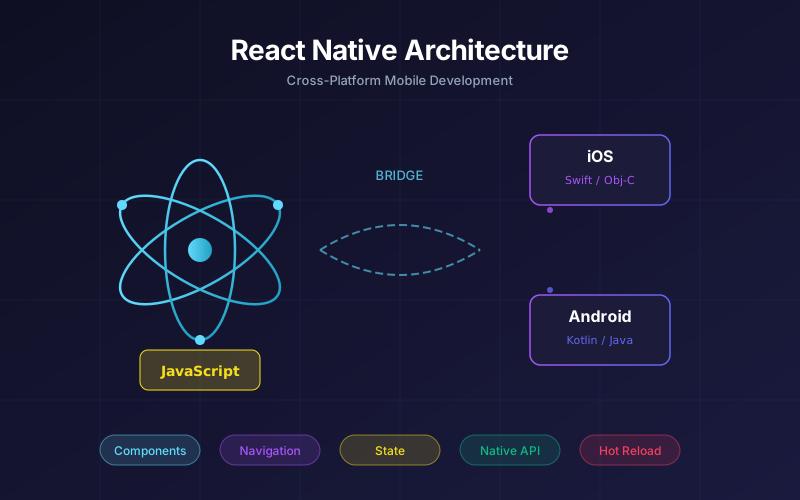 ## 一、React Native 核心概念 React Native 是 Facebook 推出的跨平台移动应用开发框架,采用"Learn Once, Write Anywhere"理念。与传统的 WebView 方案不同,React Native 渲染的是真正的原生组件,性能接近原生应用。 ### 架构原理 React Native 的核心是 JavaScript Bridge(桥接机制)。JavaScript 代码运行在 JSCore(iOS)或 V8/ Hermes(Android)引擎中,通过异步消息队列与原生模块通信。React 代码描述 UI 结构,Native 模块负责实际渲染。
// React Native 渲染流程示意
// JS Thread → Bridge → Native Thread
const App = () => {
  return (
    <View>
      <Text>Hello React Native</Text>
    </View>
  );
};
// 上述代码会被转换为原生组件指令
// iOS: RCTView, RCTText
// Android: ReactViewGroup, ReactTextView
### 新架构:Fabric 与 TurboModules
React Native 0.68+ 引入新架构,核心改进包括:
- **Fabric**:新渲染系统,支持同步渲染和优先级调度
- **TurboModules**:延迟加载原生模块,减少启动时间
- **Codegen**:静态类型保证 JS 与 Native 的接口一致性
## 二、环境搭建
### 开发环境配置
React Native 开发需要配置完整的原生开发环境。推荐使用官方 CLI 方式:
# 安装依赖(macOS 示例)
brew install node watchman
brew install --cask adoptopenjdk/openjdk/adoptopenjdk11

# Android Studio 配置
# 安装 Android SDK、Android SDK Platform-Tools、Android SDK Build-Tools

# iOS 开发需要 Xcode 和 CocoaPods
sudo gem install cocoapods

# 创建新项目
npx react-native@latest init MyFirstApp --template react-native-template-typescript

# 启动开发服务器
cd MyFirstApp
npx react-native start

# 运行应用
npx react-native run-ios  # iOS 模拟器
npx react-native run-android  # Android 模拟器
### 项目目录结构
MyFirstApp/
├── android/          # Android 原生代码
├── ios/              # iOS 原生代码
├── src/
│   ├── components/   # 可复用组件
│   ├── screens/      # 页面组件
│   ├── navigation/   # 导航配置
│   ├── services/     # API 服务
│   ├── store/        # 状态管理
│   └── utils/        # 工具函数
├── App.tsx           # 应用入口
├── package.json
└── tsconfig.json
## 三、组件系统深度解析 React Native 提供了一套核心组件,映射到平台原生控件。 ### 核心组件对照表 | React Native | iOS 组件 | Android 组件 | |-------------|---------|-------------| | View | UIView | ViewGroup | | Text | UITextView | TextView | | Image | UIImageView | ImageView | | ScrollView | UIScrollView | ScrollView | | TextInput | UITextField | EditText | ### 样式系统:StyleSheet React Native 使用类 CSS 的样式系统,但有几个关键差异:
import { StyleSheet, View, Text, Dimensions } from 'react-native';

const { width, height } = Dimensions.get('window');

const styles = StyleSheet.create({
  container: {
    flex: 1,                          // 弹性布局
    backgroundColor: '#F5F5F5',
    paddingTop: Platform.OS === 'ios' ? 44 : 0, // 平台适配
  },
  card: {
    width: width - 32,                // 响应式宽度
    padding: 16,
    borderRadius: 8,
    backgroundColor: '#FFFFFF',
    shadowColor: '#000',
    shadowOffset: { width: 0, height: 2 },
    shadowOpacity: 0.1,
    shadowRadius: 4,
    elevation: 3,                     // Android 阴影
  },
  title: {
    fontSize: 18,
    fontWeight: '600',
    color: '#333333',
    lineHeight: 24,
  },
});
### 高性能列表:FlatList
处理大数据列表时,FlatList 比 ScrollView 更高效,支持虚拟化渲染:
import { FlatList, TouchableOpacity, Image } from 'react-native';

interface Product {
  id: string;
  name: string;
  price: number;
  image: string;
}

const ProductList = ({ products }: { products: Product[] }) => {
  const renderItem = ({ item, index }: { item: Product; index: number }) => (
    <TouchableOpacity
      style={styles.productItem}
      activeOpacity={0.8}
      onPress={() => handlePress(item)}
    >
      <Image source={{ uri: item.image }} style={styles.productImage} />
      <Text style={styles.productName}>{item.name}</Text>
      <Text style={styles.productPrice}>¥{item.price.toFixed(2)}</Text>
    </TouchableOpacity>
  );

  return (
    <FlatList
      data={products}
      renderItem={renderItem}
      keyExtractor={(item) => item.id}
      numColumns={2}                    // 网格布局
      showsVerticalScrollIndicator={false}
      contentContainerStyle={styles.listContainer}
      // 性能优化配置
      initialNumToRender={10}           // 首屏渲染数量
      maxToRenderPerBatch={5}           // 每批渲染数量
      windowSize={5}                    // 渲染窗口大小
      removeClippedSubviews={true}      // 移除不可见视图
      ListEmptyComponent={EmptyComponent}
      ListFooterComponent={FooterComponent}
      onEndReached={loadMore}
      onEndReachedThreshold={0.5}
    />
  );
};
## 四、导航路由:React Navigation
React Navigation 是 React Native 生态中最流行的导航库,支持多种导航模式。
### 安装配置
# 安装核心库和依赖
npm install @react-navigation/native @react-navigation/native-stack
npm install react-native-screens react-native-safe-area-context

# 底部导航
npm install @react-navigation/bottom-tabs

# 抽屉导航
npm install @react-navigation/drawer react-native-gesture-handler
### 导航配置示例
import { NavigationContainer } from '@react-navigation/native';
import { createNativeStackNavigator } from '@react-navigation/native-stack';
import { createBottomTabNavigator } from '@react-navigation/bottom-tabs';
import { Ionicons } from '@expo/vector-icons';

const Stack = createNativeStackNavigator();
const Tab = createBottomTabNavigator();

// Tab 导航
const HomeTabs = () => (
  <Tab.Navigator
    screenOptions={({ route }) => ({
      tabBarIcon: ({ focused, color, size }) => {
        const icons: Record<string, string> = {
          Home: focused ? 'home' : 'home-outline',
          Category: focused ? 'list' : 'list-outline',
          Cart: focused ? 'cart' : 'cart-outline',
          Profile: focused ? 'person' : 'person-outline',
        };
        return <Ionicons name={icons[route.name]} size={size} color={color} />;
      },
      tabBarActiveTintColor: '#007AFF',
      tabBarInactiveTintColor: '#999999',
      headerShown: false,
    })}
  >
    <Tab.Screen name="Home" component={HomeScreen} />
    <Tab.Screen name="Category" component={CategoryScreen} />
    <Tab.Screen name="Cart" component={CartScreen} />
    <Tab.Screen name="Profile" component={ProfileScreen} />
  </Tab.Navigator>
);

// Stack 导航
const AppNavigator = () => (
  <NavigationContainer>
    <Stack.Navigator
      initialRouteName="Main"
      screenOptions={{
        headerStyle: { backgroundColor: '#FFFFFF' },
        headerTintColor: '#000000',
        headerTitleStyle: { fontWeight: '600' },
      }}
    >
      <Stack.Screen
        name="Main"
        component={HomeTabs}
        options={{ headerShown: false }}
      />
      <Stack.Screen
        name="ProductDetail"
        component={ProductDetailScreen}
        options={({ route }) => ({ title: route.params?.productName })}
      />
      <Stack.Screen
        name="Settings"
        component={SettingsScreen}
        options={{ presentation: 'modal' }}
      />
    </Stack.Navigator>
  </NavigationContainer>
);
### 导航传参与深层链接
// 导航传参
navigation.navigate('ProductDetail', {
  productId: '123',
  productName: 'iPhone 15 Pro',
});

// 接收参数
const ProductDetailScreen = ({ route, navigation }) => {
  const { productId, productName } = route.params;

  // 设置导航栏按钮
  React.useLayoutEffect(() => {
    navigation.setOptions({
      headerRight: () => (
        <TouchableOpacity onPress={() => shareProduct(productId)}>
          <Ionicons name="share-outline" size={24} />
        </TouchableOpacity>
      ),
    });
  }, [navigation, productId]);

  return <ProductView id={productId} />;
};

// 深层链接配置
const linking = {
  prefixes: ['myapp://', 'https://www.myapp.com'],
  config: {
    screens: {
      ProductDetail: 'product/:productId',
      Category: 'category/:categoryId',
    },
  },
};

<NavigationContainer linking={linking}>
  {/* ... */}
</NavigationContainer>
## 五、状态管理方案对比
### 状态管理选择指南
| 方案 | 适用场景 | 学习曲线 | 性能 |
|-----|---------|---------|-----|
| React Context + useReducer | 小型应用、简单状态 | 低 | 中 |
| Redux Toolkit | 大型应用、复杂状态流 | 中 | 高 |
| Zustand | 中型应用、追求简洁 | 低 | 高 |
| MobX | 响应式编程偏好 | 中 | 高 |
### Zustand 实战
Zustand 是轻量级状态管理库,API 简洁,支持 TypeScript:
import { create } from 'zustand';
import { persist, createJSONStorage } from 'zustand/middleware';

interface CartItem {
  id: string;
  name: string;
  price: number;
  quantity: number;
}

interface CartStore {
  items: CartItem[];
  addItem: (item: Omit<CartItem, 'quantity'>) => void;
  removeItem: (id: string) => void;
  updateQuantity: (id: string, quantity: number) => void;
  clearCart: () => void;
  getTotal: () => number;
}

const useCartStore = create<CartStore>()(
  persist(
    (set, get) => ({
      items: [],

      addItem: (item) => set((state) => {
        const existing = state.items.find(i => i.id === item.id);
        if (existing) {
          return {
            items: state.items.map(i =>
              i.id === item.id
                ? { ...i, quantity: i.quantity + 1 }
                : i
            ),
          };
        }
        return { items: [...state.items, { ...item, quantity: 1 }] };
      }),

      removeItem: (id) => set((state) => ({
        items: state.items.filter(i => i.id !== id),
      })),

      updateQuantity: (id, quantity) => set((state) => ({
        items: quantity > 0
          ? state.items.map(i => i.id === id ? { ...i, quantity } : i)
          : state.items.filter(i => i.id !== id),
      })),

      clearCart: () => set({ items: [] }),

      getTotal: () => {
        const { items } = get();
        return items.reduce((sum, item) => sum + item.price * item.quantity, 0);
      },
    }),
    {
      name: 'cart-storage',
      storage: createJSONStorage(() => AsyncStorage),
    }
  )
);

// 组件中使用
const CartScreen = () => {
  const { items, addItem, removeItem, getTotal } = useCartStore();

  return (
    <View>
      {items.map(item => (
        <CartItem key={item.id} item={item} onRemove={removeItem} />
      ))}
      <Text>Total: ¥{getTotal().toFixed(2)}</Text>
    </View>
  );
};
## 六、原生模块集成
当 React Native 提供的 API 无法满足需求时,需要编写原生模块。
### iOS 原生模块示例
// RNBiometricModule.h
#import <React/RCTBridgeModule.h>
#import <LocalAuthentication/LocalAuthentication.h>

@interface RNBiometricModule : NSObject <RCTBridgeModule>
@end

// RNBiometricModule.m
#import "RNBiometricModule.h"

@implementation RNBiometricModule

RCT_EXPORT_MODULE(BiometricModule);

RCT_EXPORT_METHOD(authenticate:(NSString *)reason
                  resolver:(RCTPromiseResolveBlock)resolve
                  rejecter:(RCTPromiseRejectBlock)reject)
{
    LAContext *context = [[LAContext alloc] init];
    NSError *error = nil;

    if ([context canEvaluatePolicy:LAPolicyDeviceOwnerAuthenticationWithBiometrics error:&error]) {
        [context evaluatePolicy:LAPolicyDeviceOwnerAuthenticationWithBiometrics
                localizedReason:reason
                          reply:^(BOOL success, NSError *error) {
            if (success) {
                resolve(@(YES));
            } else {
                reject(@"AUTH_FAILED", error.localizedDescription, error);
            }
        }];
    } else {
        reject(@"NOT_AVAILABLE", @"Biometric not available", nil);
    }
}

@end
### Android 原生模块示例
// BiometricModule.java
package com.myapp.modules;

import android.content.Context;
import androidx.biometric.BiometricManager;
import androidx.biometric.BiometricPrompt;
import com.facebook.react.bridge.*;

public class BiometricModule extends ReactContextBaseJavaModule {
    public BiometricModule(ReactApplicationContext context) {
        super(context);
    }

    @Override
    public String getName() {
        return "BiometricModule";
    }

    @ReactMethod
    public void authenticate(String reason, Promise promise) {
        BiometricManager biometricManager = BiometricManager.from(getReactApplicationContext());

        if (biometricManager.canAuthenticate() != BiometricManager.BIOMETRIC_SUCCESS) {
            promise.reject("NOT_AVAILABLE", "Biometric not available");
            return;
        }

        BiometricPrompt.PromptInfo promptInfo = new BiometricPrompt.PromptInfo.Builder()
            .setTitle("Authentication")
            .setSubtitle(reason)
            .setNegativeButtonText("Cancel")
            .build();

        BiometricPrompt biometricPrompt = new BiometricPrompt(
            getCurrentActivity(),
            getReactApplicationContext().getMainExecutor(),
            new BiometricPrompt.AuthenticationCallback() {
                @Override
                public void onAuthenticationSucceeded(BiometricPrompt.AuthenticationResult result) {
                    promise.resolve(true);
                }

                @Override
                public void onAuthenticationFailed() {
                    promise.reject("AUTH_FAILED", "Authentication failed");
                }
            }
        );

        biometricPrompt.authenticate(promptInfo);
    }
}
### TypeScript 声明与使用
// types/native-modules.d.ts
declare module 'BiometricModule' {
  export function authenticate(reason: string): Promise<boolean>;
}

// 使用原生模块
import { NativeModules } from 'react-native';
const { BiometricModule } = NativeModules;

const handleBiometricAuth = async () => {
  try {
    const success = await BiometricModule.authenticate('Please authenticate to continue');
    if (success) {
      // 认证成功
    }
  } catch (error) {
    console.error('Biometric auth failed:', error);
  }
};
## 七、性能优化实战
### 渲染性能优化
import { memo, useCallback, useMemo, PureComponent } from 'react';
import { StyleSheet, View, Text, Image, InteractionManager } from 'react-native';

// 1. 使用 memo 避免不必要渲染
const ProductCard = memo(({ product, onPress }: Props) => {
  console.log('ProductCard render:', product.id);

  return (
    <TouchableOpacity style={styles.card} onPress={onPress}>
      <Image source={{ uri: product.image }} style={styles.image} />
      <Text>{product.name}</Text>
    </TouchableOpacity>
  );
}, (prevProps, nextProps) => {
  // 自定义比较函数
  return prevProps.product.id === nextProps.product.id
    && prevProps.product.name === nextProps.product.name;
});

// 2. useCallback 缓存回调
const ProductList = ({ products }: Props) => {
  const handlePress = useCallback((id: string) => {
    // 使用 id 导航
  }, []);

  const renderItem = useCallback(({ item }) => (
    <ProductCard product={item} onPress={() => handlePress(item.id)} />
  ), [handlePress]);

  return <FlatList data={products} renderItem={renderItem} />;
};

// 3. InteractionManager 延迟非关键任务
const HomeScreen = () => {
  const [data, setData] = useState(null);

  useEffect(() => {
    // 动画完成后再执行数据加载
    const task = InteractionManager.runAfterInteractions(() => {
      fetchInitialData().then(setData);
    });

    return () => task.cancel();
  }, []);

  return <View>{/* ... */}</View>;
};
### 内存优化
// 图片缓存优化
import { Image } from 'react-native';

const OptimizedImage = ({ uri, style }) => {
  return (
    <Image
      source={{
        uri,
        cache: 'force-cache',  // iOS 缓存策略
      }}
      style={style}
      resizeMode="contain"
      defaultSource={require('./placeholder.png')}  // 占位图
      onLoadStart={() => console.log('Loading...')}
      onLoadEnd={() => console.log('Loaded')}
      onError={(e) => console.error('Image error:', e.nativeEvent.error)}
    />
  );
};

// 使用 react-native-fast-image 处理大图
import FastImage from 'react-native-fast-image';

const FastOptimizedImage = ({ uri, style }) => (
  <FastImage
    source={{
      uri,
      priority: FastImage.priority.normal,
      cache: FastImage.cacheControl.immutable,
    }}
    style={style}
    resizeMode={FastImage.resizeMode.contain}
  />
);
### 启动优化
// App.tsx
import { AppState, InteractionManager } from 'react-native';

const App = () => {
  const [isReady, setIsReady] = useState(false);

  useEffect(() => {
    // 延迟初始化非关键模块
    const initTask = InteractionManager.runAfterInteractions(async () => {
      // 预加载字体
      await Font.loadAsync({
        'CustomFont': require('./assets/fonts/CustomFont.ttf'),
      });

      // 预加载关键数据
      await store.dispatch(fetchUser());

      setIsReady(true);
    });

    return () => initTask.cancel();
  }, []);

  if (!isReady) {
    return <SplashScreen />;
  }

  return <NavigationContainer>{/* ... */}</NavigationContainer>;
};
## 八、实战案例:电商应用架构
### 项目结构设计
// src/services/api.ts
import axios, { AxiosInstance, AxiosRequestConfig } from 'axios';

class ApiService {
  private client: AxiosInstance;

  constructor() {
    this.client = axios.create({
      baseURL: 'https://api.example.com/v1',
      timeout: 10000,
      headers: { 'Content-Type': 'application/json' },
    });

    // 请求拦截器:添加 token
    this.client.interceptors.request.use(async (config) => {
      const token = await AsyncStorage.getItem('token');
      if (token) {
        config.headers.Authorization = `Bearer ${token}`;
      }
      return config;
    });

    // 响应拦截器:统一错误处理
    this.client.interceptors.response.use(
      response => response,
      error => {
        if (error.response?.status === 401) {
          // token 过期,跳转登录
          store.dispatch(logout());
        }
        return Promise.reject(error);
      }
    );
  }

  async get<T>(url: string, config?: AxiosRequestConfig): Promise<T> {
    const response = await this.client.get<T>(url, config);
    return response.data;
  }

  async post<T>(url: string, data?: unknown, config?: AxiosRequestConfig): Promise<T> {
    const response = await this.client.post<T>(url, data, config);
    return response.data;
  }
}

export const api = new ApiService();

// src/store/productStore.ts
import { create } from 'zustand';
import { api } from '@/services/api';

interface Product {
  id: string;
  name: string;
  price: number;
  image: string;
  category: string;
}

interface ProductStore {
  products: Product[];
  categories: string[];
  loading: boolean;
  error: string | null;
  fetchProducts: (category?: string) => Promise<void>;
  searchProducts: (query: string) => Promise<void>;
}

export const useProductStore = create<ProductStore>((set, get) => ({
  products: [],
  categories: [],
  loading: false,
  error: null,

  fetchProducts: async (category) => {
    set({ loading: true, error: null });
    try {
      const params = category ? { category } : {};
      const response = await api.get<{ products: Product[]; categories: string[] }>('/products', { params });
      set({
        products: response.products,
        categories: response.categories,
        loading: false
      });
    } catch (error) {
      set({ error: 'Failed to load products', loading: false });
    }
  },

  searchProducts: async (query) => {
    set({ loading: true });
    try {
      const response = await api.get<Product[]>('/products/search', { params: { q: query } });
      set({ products: response, loading: false });
    } catch (error) {
      set({ error: 'Search failed', loading: false });
    }
  },
}));
## 总结
React Native 跨平台开发的核心优势在于:
1. **代码复用率高**:iOS 和 Android 共享 70%-90% 的业务代码,显著降低开发和维护成本。
2. **原生性能体验**:通过 Bridge 机制渲染真正的原生组件,配合 Fabric 新架构实现更流畅的交互体验。
3. **生态成熟完善**:React Navigation、Redux、Zustand 等成熟库支持,社区活跃,问题易解决。
4. **热更新能力**:通过 CodePush 实现绕过应用商店审核的动态更新,快速迭代修复问题。
5. **TypeScript 支持完善**:类型安全增强代码健壮性,团队协作更高效。
**开发建议**:
- 小型项目推荐使用 Zustand + React Navigation,配置简单,上手快
- 中大型项目建议采用 Redux Toolkit + TypeScript,规范团队代码风格
- 性能敏感场景(动画、大数据列表)优先考虑 Fabric 新架构
- 原生模块开发遵循单一职责原则,避免过度耦合
React Native 已成为企业级移动开发的重要选择。掌握其核心原理和最佳实践,能够帮助开发者构建高性能、可维护的跨平台应用。
本文链接:https://www.kkkliao.cn/?id=961 转载需授权!
版权声明:本文由廖万里的博客发布,如需转载请注明出处。









